You cannot upload music to Spotify yourself. Spotify only accepts music delivered by labels and distributors, so for an independent artist “uploading to Spotify” means uploading to a distributor, which delivers the release to Spotify and pays you the royalties it earns. Your artist profile is created automatically the first time your music goes live. There is no sign-up form for it.
The job is six steps: finish a lossless master and square cover art, get the metadata right, choose a distributor, upload with a release date a few weeks out, claim your Spotify for Artists profile, and pitch one song to Spotify's editors at least 7 days before release. Everything below was checked against Spotify's help centre in October 2026, including the 2026 change to what “verified” means.
Key takeaways
- You need a distributor or a label. Spotify says all music must come through one.
- Deliver early. Spotify needs 5 business days to get music live; pitch at least 7 days before release to choose your Release Radar song.
- Your profile is claimed, not created, through Spotify for Artists.
- “Verified” changed in 2026. The blue tick became a Registered Artist label; the new Verified by Spotify badge needs, among other things, 10,000 monthly listeners for three consecutive months.
- No royalties below 1,000 streams in the previous 12 months.
- Never buy streams. Spotify can withhold royalties and remove music.
Can you upload music to Spotify directly?
No. Spotify's help page on creating an artist profile says it requires all music to be uploaded via labels and distributors “to make sure everything's properly licensed,” and that it is not possible to create an artist profile yourself. The profile appears when your first release goes live.
There was briefly an exception. Spotify tested a direct-upload tool with invited US artists from September 2018 and shut it down on 30 July 2019, pointing them to distributors, according to TechCrunch's report at the time (Spotify's announcement is no longer online). Any service offering to put your track on Spotify is a distributor or is reselling one.
Step 1: Finish the master and the cover art
Get the audio and the cover final before you start an upload, because changing either after delivery means your distributor has to send Spotify an update. Spotify publishes what it accepts from distributors in its artwork and audio specifications, and the artist-facing version in its cover art requirements:
| Item | Spotify's requirement (checked October 2026) |
|---|---|
| Audio format | FLAC or WAV; FLAC is preferred for delivery |
| Bit depth and channels | 16-bit or 24-bit, 2-channel |
| Sample rate | 44.1kHz or higher |
| Cover art format | TIFF, PNG or JPG, using lossless encoding |
| Cover art size | 640px to 10,000px wide and tall, 1:1 square |
| Cover art colour | sRGB, 24 bits per pixel; no embedded colour profiles; no upscaling |
Those are delivery specifications, and your distributor may have its own upload rules on top. The practical rule: export a lossless WAV or FLAC of the final master, never an MP3, and make the cover from full-resolution square artwork rather than enlarging a small image.
Step 2: Get the metadata and credits right
Spotify displays your music “exactly as it's delivered,” and only your label or distributor can send a correction, so metadata mistakes are slow to fix. Spotify's music metadata guidelines come down to these rules:
- One artist per field. List every contributing artist in a separate field, in the order you want them shown, and spell your name identically on every release, punctuation included.
- No keyword names. Spotify does not allow artist names built from search terms, giving “Christmas Hits” and “Sleep Music” as examples.
- Credits at track and release level. Include performers and non-performers: main and featured artists, remixers, composers, lyricists and producers. Keep artist names out of track and release titles.
- Explicit tags, not title text. Mark explicit tracks as explicit. Spotify adds the E icon itself, so do not type it into the title.
- Countries. Choose the territories you want, or set worldwide availability.
Your distributor will normally attach two identifiers when you upload: an ISRC for each recording and a UPC for the release. If a track has been released before, supply its original ISRC rather than letting a new distributor create a fresh one; ISRC codes explained covers why. If you wrote the song with other people, agree the ownership splits in writing before release with a split sheet, because the credits you deliver now are the ones that follow the track.
Step 3: Choose a distributor
Spotify keeps a provider directory of distributors that, in the words of its getting-started page, “meet our highest standards for quality metadata and anti-infringement measures.” Its artist distributor list includes DistroKid, CD Baby, TuneCore, Amuse, RouteNote, LANDR, EmuBands, Record Union, Too Lost and Ditto Music, among others (checked October 2026). Most carry a “preferred” tag, and Spotify says the artist distributors listed offer instant access to Spotify for Artists for all their users.
Spotify's own note is that “most distributors charge a fee or commission.” We compare current prices in best music distribution services and the no-upfront-cost options in free music distribution. Ask what happens to your releases if you stop paying, how the distributor pays you, and whether it accepts your kind of music. That last question matters most for AI-assisted music: see which distributors allow AI music and can you sell AI music on Spotify.
Step 4: Upload and set a release date
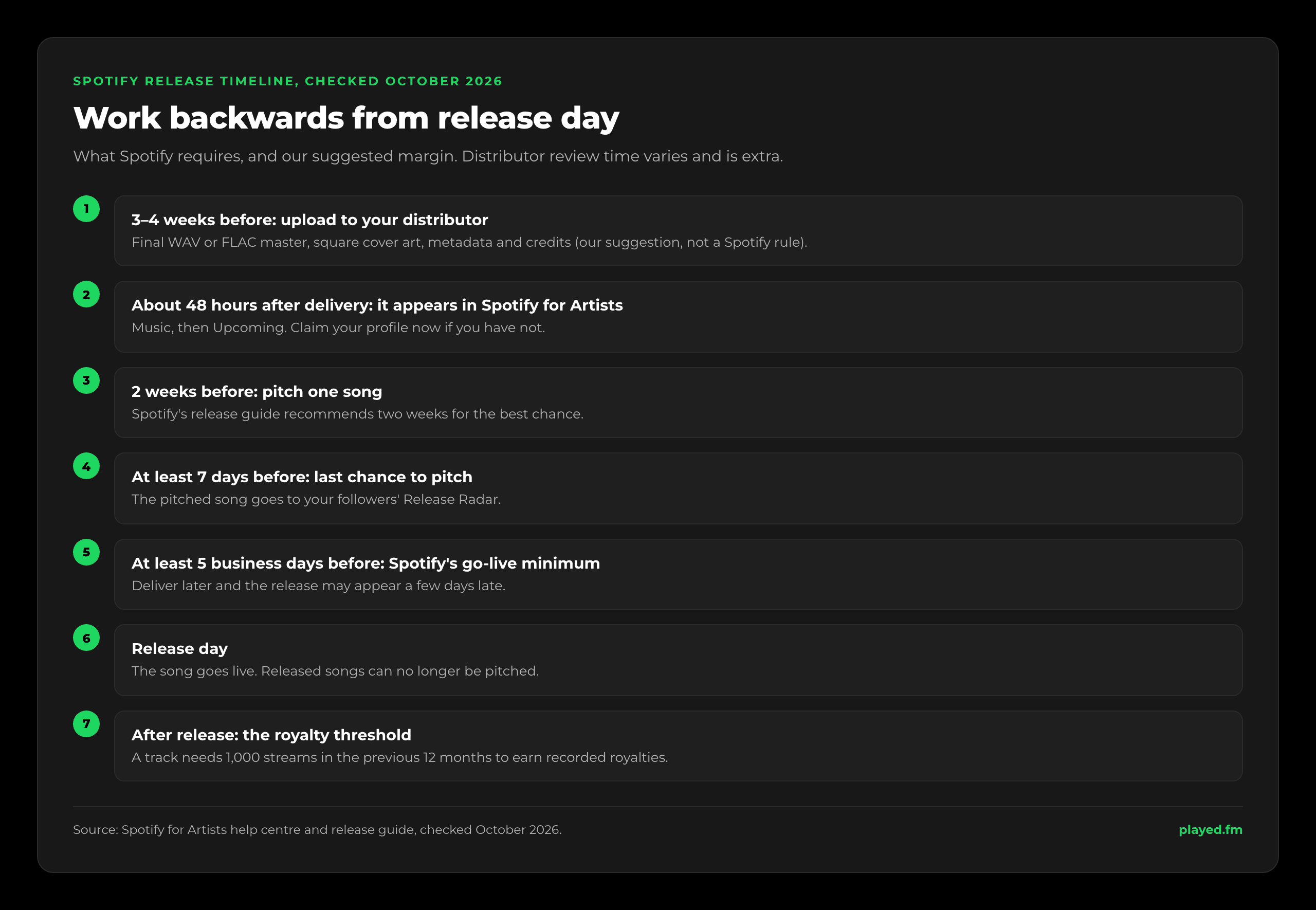
In your distributor's dashboard, create a release, add the audio, cover and metadata, choose stores and territories, and set a release date. The date is the part people rush, and Spotify sets three timings around it:
- 5 business days to go live. Spotify says it needs five business days to get new music live. Deliver later than that and the release may appear a few days after its date.
- About 48 hours to show in Spotify for Artists. After your distributor sends the release, it can take around 48 hours to appear in your Upcoming tab.
- At least 7 days to pitch. Spotify recommends setting the live date at least 7 days ahead so you have time to pitch an unreleased song to its editors.
Distributors add their own review time on top, and it varies. Our suggestion is to submit three to four weeks before release day. That leaves room to fix a rejected cover or a misspelt credit, to claim your profile, and to pitch two weeks out, which is what Spotify's own release guide recommends for the best chance with editors.
Step 5: Claim your Spotify for Artists profile
Spotify for Artists is where you see audience stats, promote your music and manage your profile. You claim an existing profile rather than creating one, and Spotify's access page describes three routes:
- Through a preferred distributor. If a preferred provider delivers your music, you get access automatically when you submit a request.
- By request. Submit a claim and add a link to your website or social channels so Spotify can confirm who you are. Requests are reviewed manually and approval can take a few days. Only one request can be open per profile at a time.
- Before your first release. Once your distributor has delivered the music, ask it for your Spotify artist link or URI, then contact Spotify with that link and the UPC or EAN of the upcoming release.
Claim before release day if you can: pitching only works on unreleased songs. Once you are in, add an artist image and bio. The Upcoming tab also lets you add a Canvas, a short looping visual, and, if eligible, create a Countdown Page for pre-saves.
Step 6: Pitch one song to Spotify's editors
Pitching puts an unreleased song in front of Spotify's playlist editors. Per Spotify's pitching guide:
- Log in at artists.spotify.com.
- Go to Music, then Upcoming.
- Choose a song and complete the pitch form. Spotify says more detail gives the song a better chance, so fill in genre, mood and the story behind it.
The rules that catch people out:
- The 7-day line. Pitch at least 7 days before release and Spotify adds that song to your followers' Release Radar. Miss it and Spotify picks which song from the release goes there.
- One song at a time. You can pitch the next one once the pitched song is live. Compilations and songs on which you are only a featured artist cannot be pitched.
- Released songs are out. Once a song goes live it is no longer eligible.
- No guarantee. A pitch does not guarantee a placement, and editors may pick a different song.
Release Radar is the dependable part. It updates every Friday, gives each listener one song per artist per week, and keeps an unheard song in for up to four weeks. It leaves out re-releases of songs already on Spotify and some alternative versions such as acoustic, karaoke and live takes, though remixes are included.
How to get verified on Spotify in 2026
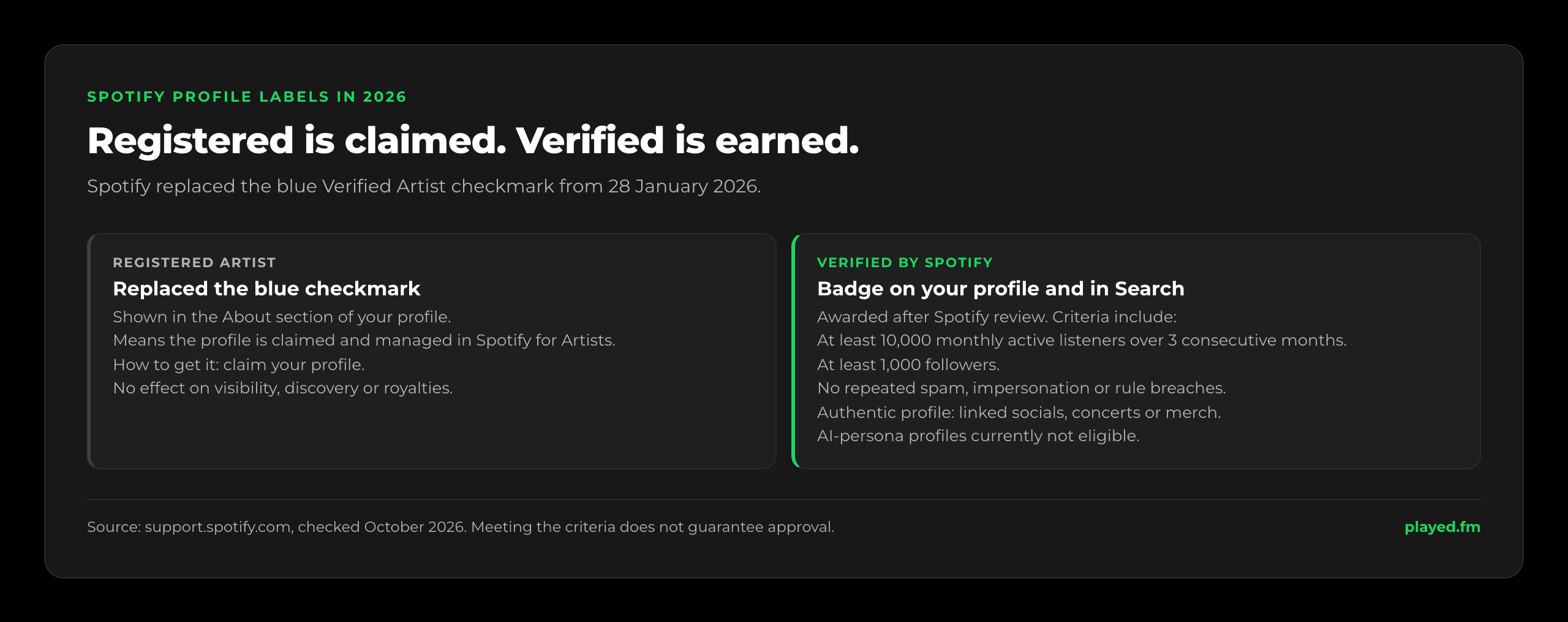
This changed in 2026. From 28 January, Spotify began replacing the blue “Verified Artist” checkmark with a Registered Artist label in the About section of profiles. Spotify's explanation is that the tick only ever meant the profile was claimed and managed in Spotify for Artists, and the change does not affect visibility, discovery, royalties or tools. Step 5 gets you that label.
The new Verified by Spotify badge is earned rather than claimed. Spotify's criteria page groups the requirements into three areas:
- Sustained listener activity, such as at least 10,000 monthly active listeners over three consecutive months and at least 1,000 followers. Spotify says it may also consider artists with an important cultural contribution or growing momentum who fall short of those numbers.
- Platform compliance: no repeated spam, impersonation or other breaches of Spotify's platform rules. Spotify can remove the badge later if an artist is found in violation.
- Profile authenticity: no deceptive content in the bio, a catalogue that is mostly music rather than noise or spoken word, and public markers such as linked social accounts, concert dates or merch.
Spotify does not describe an application step. Reviews happen on a rolling basis, meeting the criteria does not guarantee immediate approval, and artists get a notification in Spotify for Artists once verified. Profiles that appear to primarily represent AI-generated or AI-persona artists are currently not eligible, though artists who use AI tools as part of their process can be, provided they present themselves authentically.
When Spotify starts paying you
Spotify pays streaming royalties through whoever delivered the track, which for an independent artist is the distributor, and the distributor then pays you on its own terms. Before any of that, a track has to qualify. Since April 2024, Spotify's track monetization rules require at least 1,000 streams in the previous 12 months for a track to count in the recorded-music royalty pool, plus a minimum number of unique listeners that Spotify does not publish.
Eligibility is recalculated monthly, so a track can drop out and come back, and in the month a track first qualifies all of that month's streams count, though earlier months' do not. The rule covers recording royalties only; publishing is separate, as how music royalties work explains. What a qualifying stream is worth is in how much artists make per stream.
Artificial streaming: the quickest way to lose a release
Spotify defines an artificial stream as one that does not reflect genuine listening intent, including bots and scripts. Its policy page is blunt: paid services that guarantee streams, or guarantee playlist placement in exchange for money, violate its terms, and using them could get your music removed.
When Spotify confirms artificial streaming, it may withhold the associated royalties, correct public stream counts and adjust charts, and in severe cases remove the song from playlists. It sends distributors monthly reports of confirmed cases, and a distributor may issue warnings or, in flagrant or repeated cases, remove your music from streaming services or suspend your account. Since 2024 Spotify has also charged labels and distributors per track when it detects flagrant artificial streaming on their content, which gives your distributor its own reason to act.
Fake streams can also arrive uninvited, usually through a suspicious playlist that adds your track; report it with Spotify's playlist reporter. If genuine streams are flagged, Spotify's advice is to show your distributor how you promoted the release so it can review the case with Spotify.
If something goes wrong
- Not live on release day. If you delivered within 5 business days of the date, wait a few days; if earlier, contact your distributor.
- Someone else's release on your profile. Use “Report incorrect release” in the Upcoming tab and tell your distributor, since Spotify notes the same mismatch usually appears on every service.
- A typo or missing credit. Only your label or distributor can send Spotify corrected metadata.
Frequently asked questions
Can I upload music to Spotify myself?
No. Spotify only accepts music delivered by labels and distributors, and it is not possible to create an artist profile yourself. You upload to a distributor, which delivers the release to Spotify and pays you the royalties. Your profile is created automatically when your first release goes live.
How much does it cost to put music on Spotify?
That depends on your distributor. Spotify’s help centre notes that most distributors charge a fee or commission, and the pricing models differ, so compare them before you commit. Our distribution guides list current prices, including the options with no upfront cost.
How long does it take for music to appear on Spotify?
Spotify says it needs 5 business days to get new music live once a distributor delivers it, and a delivered release can take around 48 hours to show in Spotify for Artists. Your distributor’s own review adds time, so submitting three to four weeks before release day is a safe margin.
How do I get verified on Spotify?
Claiming your profile in Spotify for Artists now gives you a Registered Artist label, which replaced the blue checkmark from January 2026. The separate Verified by Spotify badge is awarded after review to artists who meet criteria such as 10,000 monthly listeners over three consecutive months, 1,000 followers, compliance with platform rules and an authentic profile.
How far ahead should I pitch to Spotify playlists?
At least 7 days before release, which also puts the pitched song in your followers’ Release Radar. Spotify’s release guide suggests two weeks for a better chance with editors. Songs that are already live cannot be pitched.
How many streams do you need to get paid on Spotify?
A track needs at least 1,000 streams in the previous 12 months, plus an unpublished minimum number of unique listeners, to earn recorded royalties. Eligibility is checked monthly, so a track can move in and out of it as its popularity changes.
The bottom line
You get music on Spotify through a distributor, not by uploading it yourself. Finish a lossless master and square cover art, get the metadata right, pick a distributor from Spotify's provider directory, and submit three to four weeks ahead. Claim your profile before release day, pitch one song at least 7 days out, and never pay anyone for streams or playlist spots.
Played is not a distributor and does not put music on Spotify, but a storefront where fans can buy the same tracks they stream, like the one you can set up on Played, sits comfortably alongside it.